
Pepper Documentation
Settings, Menu’s, Widgets & MiscThe sidebar can be edited in the Divi library.
The footer can be edited in the Theme Builder.
The bottom bar can only be edited in the functions.php file.
I do not offer support on changing the above file, as stated in the readmore.pdf file included in the download. If you need to change to colour of the bottom bar, you can do so in the Theme Customizer on line 508 of the Additional CSS.
Fonts:
I have included the Butler Light font in the download, Upload this font into the heading h2 setting in the Design tab of the module.
To upload your script font, click on the 2nd area that is marked text – also in the Design tab of the module.
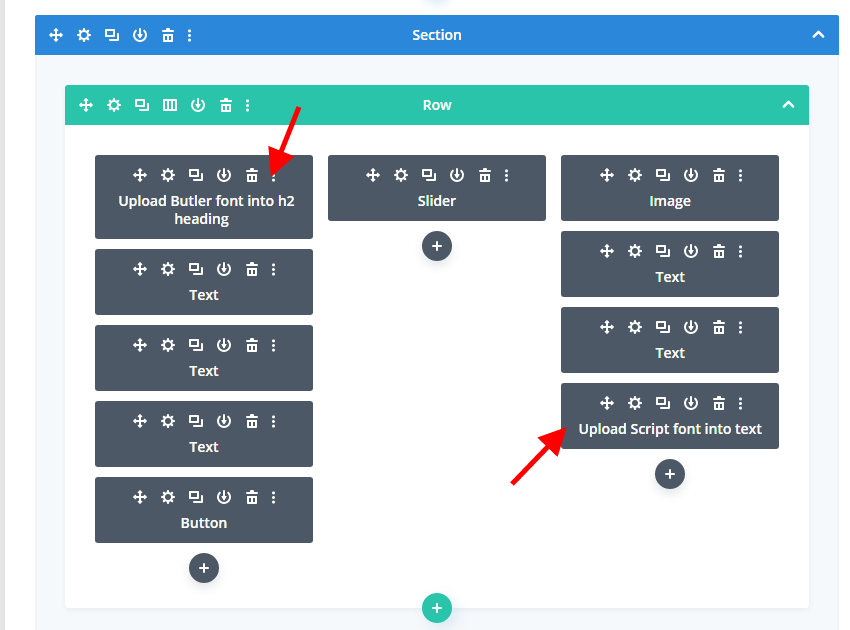
If you change the fonts from what is included with the demo, you will need to change the font in each module.
Instagram feed
Go to the home page of the Instagram feed plugin on the menu. Click the big blue button to add your account.
Save the page.
Then go to the customisation tab and set the columns to 5 and photos to 5 with 10px padding.
Uncheck all tick boxes on the way down and save the page.
Sidebar
On the widgets page, remove all widgets that are added to the main sidebar and 1st footer sidebar.
Add a text module to the main sidebar and paste the following shortcode to the widget:
[************et_pb_section global_module=”497″][/et_pb_section************]
Remove the asterisks above before pasting into the widget. I have added the asterisks, so that the code can be copied and pasted.